
Feature
An editor your agent can drive
Kapture exposes its whole editor over MCP — the open standard AI assistants use to operate tools. Connect Claude Code, Codex or Cursor in one copied command, then ask in plain language: cut the dead air, caption it, make a vertical, export all three.
42 tools, the same engine as your clicks
Agents use the same commands the editor does — open projects, trim, split, place zooms, style captions, arrange clips, run exports. Every change appears live in the window you're watching, and ⌘Z works on all of it.
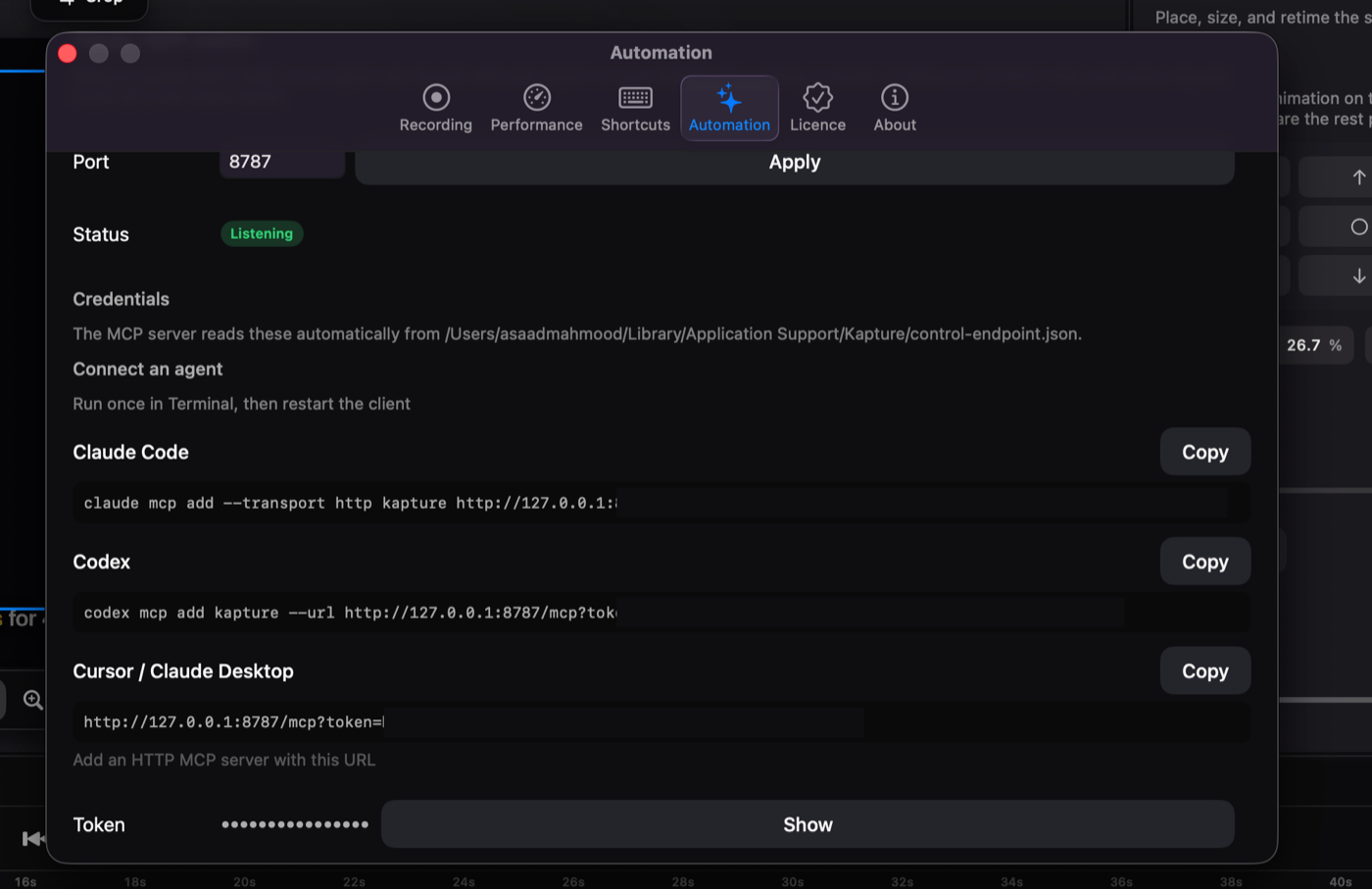
Connect in one command
Settings → Automation shows a ready-made command per client with your token filled in. Copy, run once in Terminal, restart the client. The server is local-only; nothing about your project leaves the machine.
Analysis, not just actuation
Tools like analyze_timeline read the transcript, markers and activity log to suggest highlight ranges — the raw material for "make me a 30-second cut of the part that matters."
Questions
Which agents work?
Anything that speaks MCP over HTTP — Claude Code, Codex, Cursor and Claude Desktop have ready-made commands in the app.
Is this safe?
The server binds to 127.0.0.1 and every request carries a token from your machine. Edits land in the open editor, visibly, and are undoable.
Where's the full tool list?
In the help docs — all 42, grouped, generated from the same manifest the app serves.